
Why ratings matter for ASO
Ratings are the most visible trust signal on a Google Play listing: they appear in search results, on the listing and in every "similar apps" row. A higher rating lifts the share of visitors who install, and a better install rate helps ranking. Recent ratings weigh more than old ones, and Google Play shows ratings per country and device type, so improvements show up in your displayed score fairly quickly.
The rules first: what Google Play forbids
Many "rating hacks" break Google Play's policies and can get an app removed. Avoid all of these:
- Incentives. No rewards, coins, unlocks or discounts for leaving a rating or review.
- Review gating. No "Do you like the app?" question that sends happy users to the store and unhappy ones to a feedback form.
- Fake or bought reviews, review exchanges and asking friends or staff to post in bulk.
- Misleading prompts that look like system dialogs or block the app until the user rates.
Everything below stays inside those rules.
Use the Google Play In-App Review API
The In-App Review API shows a Google Play rating card inside your app, so users can rate and write a review without leaving what they were doing. It removes the biggest drop-off: the jump to the store page.
What to know before you implement it:
- Google Play enforces a quota. Calling the API does not guarantee the dialog appears, and the API does not tell you whether the user rated.
- Don't put a question or a "Rate us" call-to-action in front of it. Trigger it from a natural point in the flow.
- Don't change your app's behaviour based on whether a review happened, because you cannot know.
- Test with internal app sharing or an internal test track, where the quota does not apply in the same way.
A permanent "Rate this app" link in settings that opens your store page is still fine. Just don't make it a prompt that interrupts people.
Ask at the right moment
Timing decides whether you get a four-star or a one-star answer. Good moments come right after a success:
- A task finished (a workout logged, a file exported, a level completed).
- The user comes back for the third or fourth session in a week.
- A goal is reached (first budget balanced, first streak).
Bad moments: first launch, during onboarding, straight after a crash or error, in the middle of a task, and right after a paywall. Keep a simple local rule, such as at least five sessions, at least three days since install, no crash this session, and not asked in the last 60 days, and let the API's quota do the rest.
Reply to reviews, especially the bad ones
Replies are public and the reviewer is notified. People can and do update their rating after a good reply. A useful reply:
- Thanks them and names the specific problem, so it is clear you read it.
- Gives a fix, a workaround or a date ("fixed in version 3.2, rolling out this week").
- Offers a direct contact for complex cases.
Reply to positive reviews too, briefly. Play Console lets you filter by rating, language and app version, and supports saved reply templates. Personalise them anyway, because copy-paste replies read like copy-paste.
Fix what low ratings are about
Asking more often only helps if the app deserves good ratings. Once a month, tag your one to three-star reviews by theme (crash, ads, price, missing feature, login). The top theme is usually your fastest rating win. Also check Android vitals: crash and ANR rates above Google's thresholds hurt both ratings and visibility.
When you ship the fix, say so in the release notes and reply to the reviews that reported it.
Benchmark your ratings against competitors
A 4.2 is great in a category where the leaders sit at 3.9 and weak where they sit at 4.7. Before setting targets, look at the apps you compete with. Play Store ASO Tweak shows the rating with decimals (4.5057 rather than 4.5), the global rating count and the review count for the store country you are viewing, on every listing. Its developer page view adds install and update data for a whole portfolio at once.
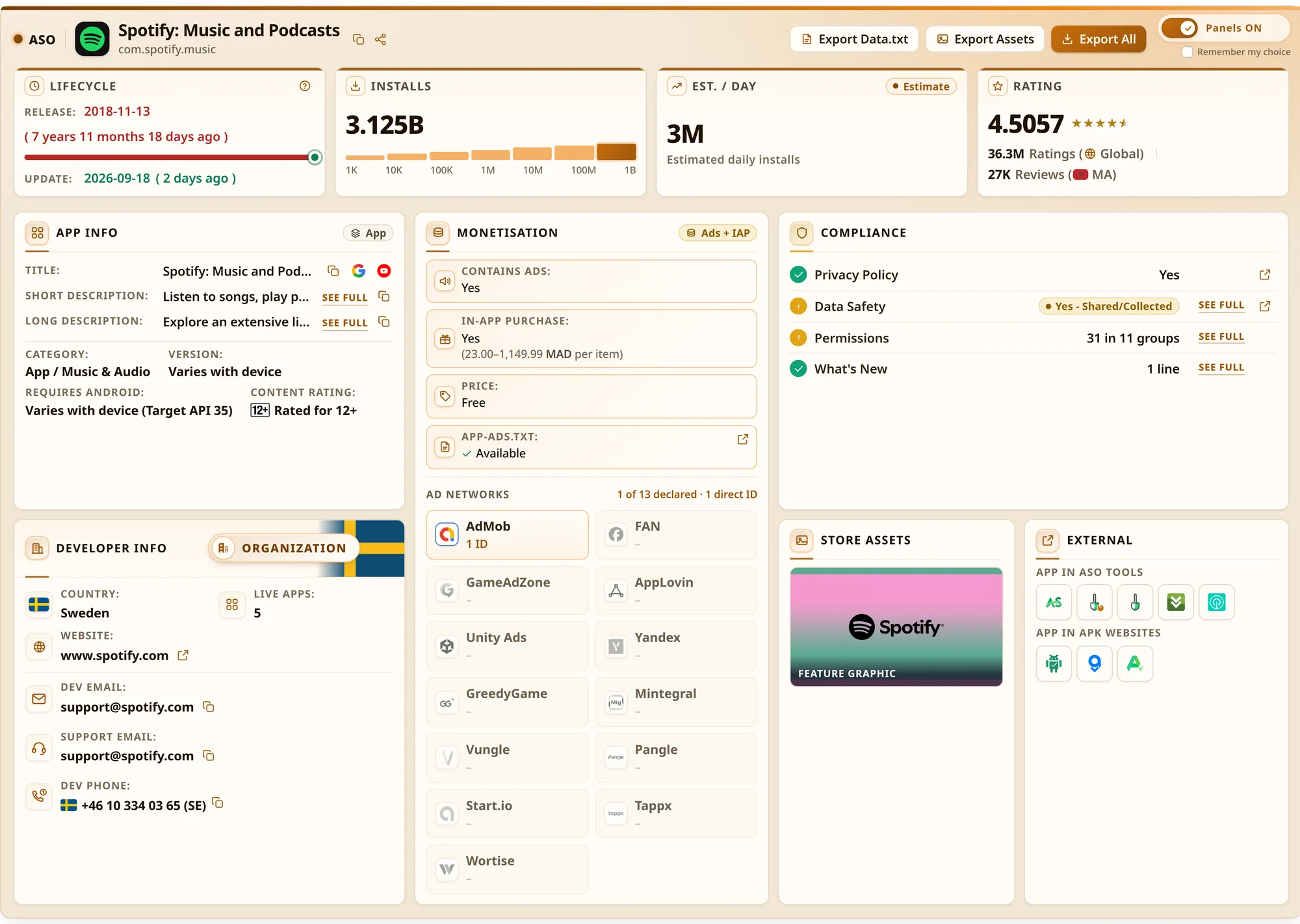
For a structured way to compare apps, see how to analyse a Google Play competitor.
A simple 30-day plan
| Week | Action |
|---|---|
| 1 | Reply to every review from the last 30 days. Tag the negative ones by theme. |
| 2 | Ship the In-App Review API behind a "success moment" rule. Add a quiet "Rate this app" link in settings. |
| 3 | Fix the top complaint theme. Mention the fix in release notes and in replies. |
| 4 | Compare rating count and average with week 0, per country, and against three competitors. |
Ratings are one part of ASO. For keywords, visuals and measurement, read the complete Google Play ASO guide.

