
What ASO means
ASO, or app store optimization, is the process of improving an app's store listing so it ranks for relevant searches and turns more page visitors into installs. It is to Google Play what SEO is to Google Search, with one difference: the "page" is a store listing with strict character limits, and the conversion (an install) happens on that same page.
ASO has two halves:
- Visibility. Appearing in search results, category charts and "similar apps" rows for the words people actually type.
- Conversion. Convincing the people who see your listing to install. Icon, screenshots, rating and the first lines of text do most of this work.
The two feed each other. A listing that converts well sends Google Play a positive signal, which helps ranking, which brings more visitors.
How Google Play search works (what we know)
Google does not publish its ranking formula, so be wary of anyone who claims to know it exactly. What is documented or widely observed:
- Text relevance. Google Play reads the app title, short description and full description. There is no separate keyword field.
- Engagement and conversion. Install rate from search, retention and uninstalls are signals that the app satisfies the query.
- Ratings and reviews. Both the average and the recent trend matter, and ratings are shown per country and device type.
- Technical quality. Google states that poor Android vitals (crash and ANR rates above its thresholds) can reduce an app's visibility.
- Install history. Download velocity and total installs help, which is why new apps start with long-tail keywords.
Listing text: title, short description and full description
These three fields are where your keywords live. Google Play limits them to:
| Field | Limit | What it is for |
|---|---|---|
| App title | 30 characters | Brand plus the single most important keyword phrase. |
| Short description | 80 characters | A clear benefit, with one or two secondary keywords. Shown on the listing before "About this app". |
| Full description | 4,000 characters | Natural explanation of features, using your keyword themes a few times each. |
Write for people first. Google Play's metadata policy forbids keyword stuffing, repeated keywords that read unnaturally, lists of unrelated terms and claims like "#1" or "best" in the title. Breaking it can get an update rejected.
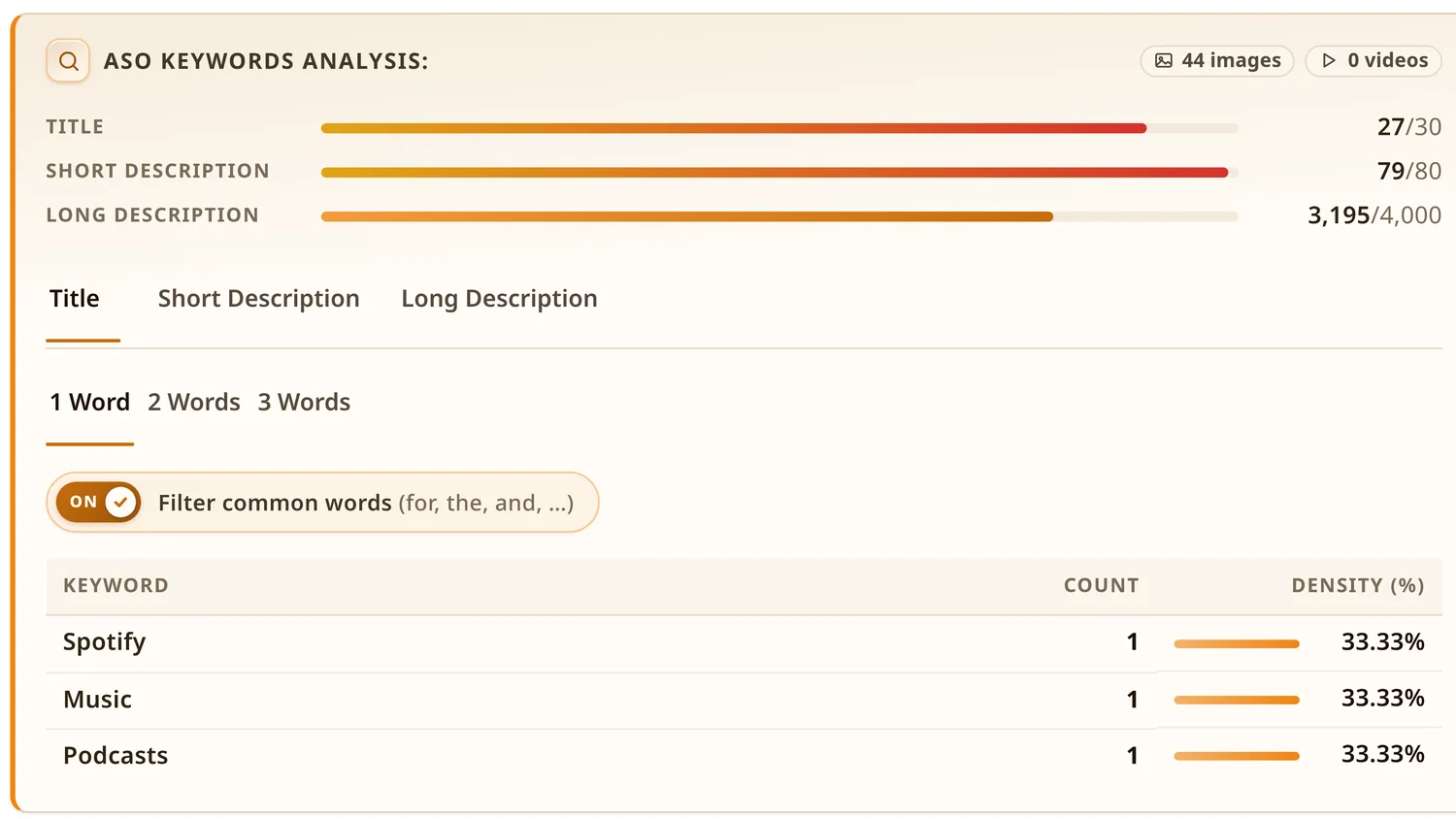
A quick way to see how a competitor uses these fields is to open their listing with the Play Store ASO Tweak extension: it shows each field's character use against the limit and a keyword density table for one, two and three-word phrases. The Google Play keyword research guide walks through that process step by step.
Icon, screenshots and video
Most visitors never read the description. They decide from the icon in search results and the first two or three screenshots.
- Icon. Simple shape, readable at small size, distinct from the apps next to you in results. Avoid text and badges like "Free" or "#1", which the policy restricts.
- Screenshots. Lead with the core benefit, not the login screen. Short captions help, especially in the first two images.
- Feature graphic and video. The 1024×500 feature graphic shows when you add a promo video or get featured. A video should show the app working within the first seconds.
Play Console's store listing experiments let you A/B test icons, screenshots and descriptions on real traffic. That is the most reliable way to improve conversion.
Ratings, reviews and quality
A 4.5 rating next to a 3.9 rating in the same search result is an easy decision for a user. Ratings affect conversion directly and ranking indirectly. The fastest honest ways to improve them are fixing the bugs people complain about, asking at the right moment with the official In-App Review API, and replying to reviews. Read how to get more app ratings on Google Play for the policy-safe details.
Markets and localization
Every country is a separate storefront with its own search results. Two practical steps:
- Make sure you are actually available. An app can be missing from a market because of distribution settings, device targeting or removal. Use the free Google Play Country Availability Checker to scan 141 markets for any package name in one pass. It works for your app and for competitors'.
- Localize the listing, not just the app. A translated title and short description, plus screenshots with local text, often lift installs more than any keyword tweak. Keyword research must be redone per language, because direct translations are rarely what people search for.
How to measure ASO
Keep it simple and use the data Google already gives you in Play Console:
- Store listing acquisition: visitors and installs by traffic source (search, explore, external) and by country.
- Search terms: which queries bring visitors and installs to your listing.
- Conversion rate: installs divided by listing visitors. Compare it with the peer benchmarks Play Console shows.
- Ratings over time and Android vitals.
Change one thing at a time, write down the date, and compare two to four weeks before and after. Seasonal effects are real, so compare against a competitor's movement too.
A 10-point Google Play ASO checklist
- Title uses your brand and your single most important keyword, under 30 characters.
- Short description states the main benefit in plain words and includes one or two secondary keywords.
- Full description covers every feature theme people search for, written naturally, with no keyword lists.
- You know the top five competitors for your main keyword and how they phrase their titles.
- The first two screenshots show the core value, with short captions.
- The icon is recognisable at small size and different from its neighbours in results.
- The app asks for ratings through the In-App Review API after a positive moment, never at launch.
- Recent negative reviews have replies and the bugs they mention are tracked.
- The listing is localized for your top markets, and you have checked the app is actually available in them.
- You review Play Console search terms and conversion monthly and log every listing change.
New to some of these terms? The ASO glossary explains each one in a sentence or two.

