
Google Play competitor analysis means collecting the public facts about rival apps (listing text, keywords, installs, ratings, monetisation, markets and update habits) and using them to decide what your own listing should do differently. You do not need paid data to get most of the value.
1. Pick the right competitors
Search your two or three main keywords on Google Play and note the top results. Add the apps in the "Similar apps" row on your own listing. Split them into:
- Leaders: the apps you learn patterns from, not the ones you try to outrank next month.
- Peers: apps close to your install tier and rating. These are your realistic ranking targets.
2. Read the listing: title, descriptions and keywords
For each competitor, note the exact title and short description, which phrases they repeat in the full description, and how much of each character limit they use. With Play Store ASO Tweak the listing shows this under the app, with copy buttons and a keyword density table for one, two and three-word phrases. The keyword research guide explains how to turn that into your own keyword list.
Look at visuals too: what the first screenshot promises, whether there is a promo video, and how many images the listing uses.
3. Size and momentum: installs, ratings and lifecycle
Google Play publishes installs as tiers (100K+, 1M+ and so on), the rating, and dates. Put them together and you can read a competitor's momentum:
- Release date and age. A two-year-old app with 10M+ installs is growing faster than a ten-year-old one.
- Last update. Apps updated every few weeks are actively maintained, while apps untouched for a year are an opening.
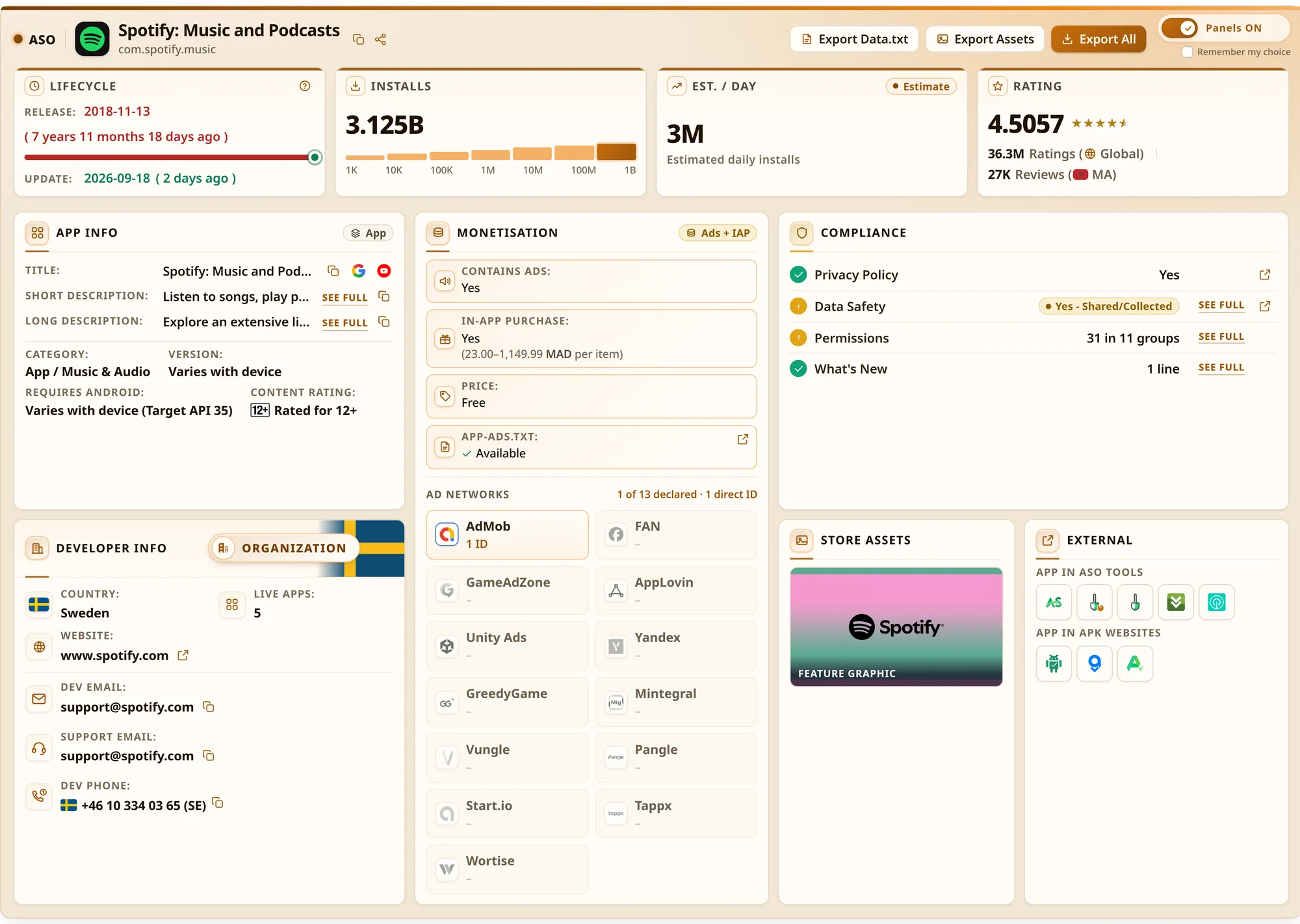
- Estimated daily installs. The extension calculates a lifetime average from the install count and the app's age, marked clearly as an estimate. Good for comparing, not for reporting.
- Rating and counts. The rating with decimals and the ratings count show how much social proof you are up against.
4. Monetisation and ad networks
How a competitor makes money shapes their listing and their users' expectations. Check:
- Contains ads / in-app purchases and the published price range per item.
- app-ads.txt. The developer's website publishes which ad networks may sell their inventory. The extension fetches it and counts networks such as AdMob, AppLovin, Unity Ads, Mintegral and Pangle by unique direct ID. This shows the ad stack, not revenue.
If every leader shows heavy ads and reviews complain about them, "no intrusive ads" might be a real differentiator for your short description.
5. Analyse the developer portfolio
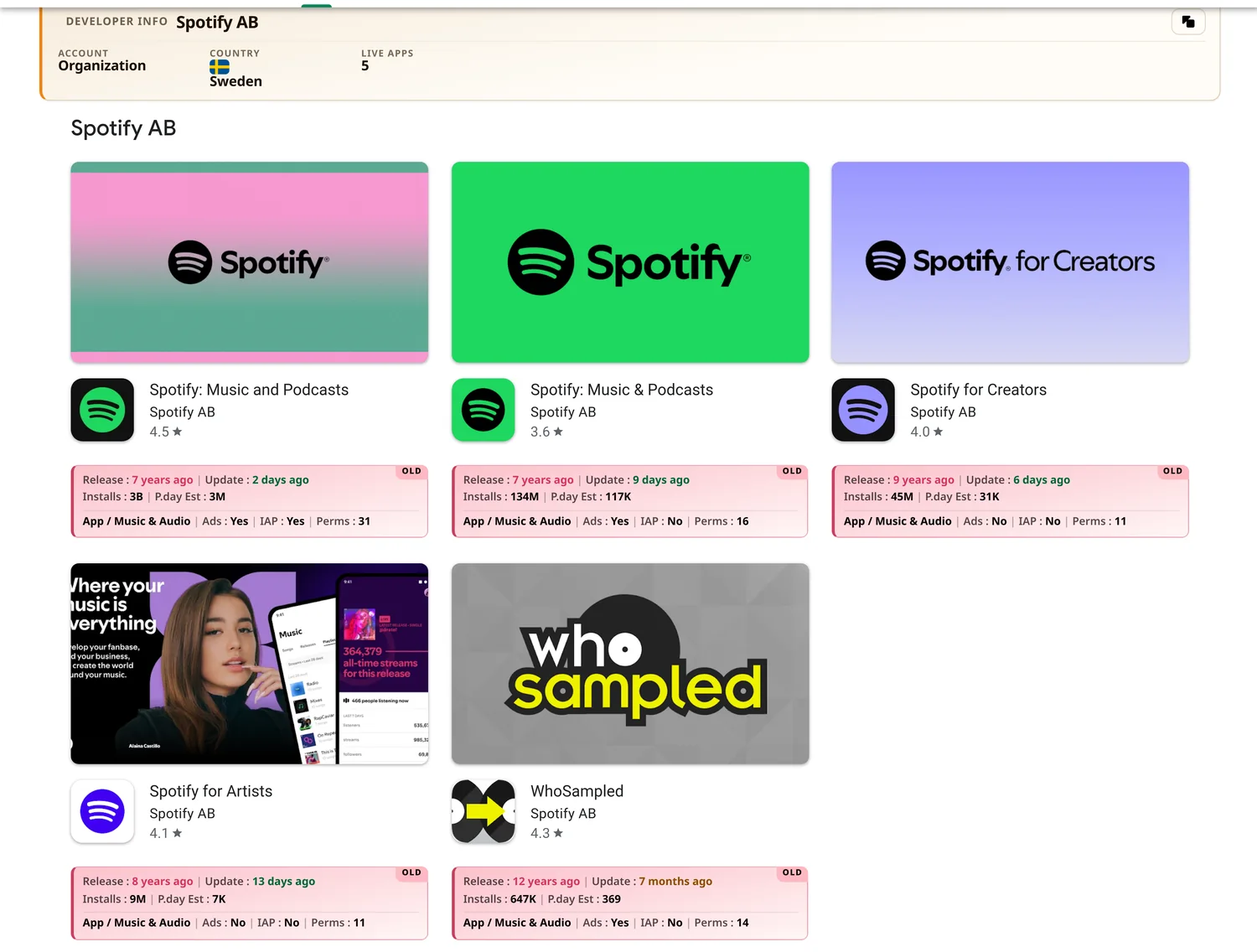
Open the competitor's developer page. It lists all their live apps, and patterns across a portfolio tell you a lot: do they launch many small apps and keep the winners, or maintain a few carefully? Which categories do they move into?
On developer pages, the extension adds a summary card under every app tile: release and update age, installs, estimated daily installs, category, ads, in-app purchases and permission count. It also shows the account type (personal or organization), country and number of live apps. A whole portfolio can be read in one pass instead of opening each app.
6. Markets and availability
An app ranking well in one country may not be available in another at all. Paste a competitor's package name into the free Country Availability Checker to see where it is available, not available or removed across 141 Google Play markets. Gaps in a strong competitor's coverage can be the easiest markets for you to enter, and confirmed removals are worth understanding before you follow them.
7. Compliance signals
Privacy policy, Data safety declarations and permissions are public on every listing. Comparing them shows whether you ask for more permissions than your category norm (which can hurt conversion), and how competitors describe data use. The extension groups permissions and links the privacy policy and Data safety section in place, and it shows the latest "What's new" text so you can track release habits.
Turn it into a competitor sheet
Keep one row per app and update it monthly. Useful columns:
| Column | Why |
|---|---|
| Title / short description | Track keyword changes over time. |
| Install tier, est. daily installs | Size and momentum. |
| Rating, ratings count | Social proof you are up against. |
| Last update | How active the team is. |
| Ads / IAP / price range | Business model. |
| Ad networks (app-ads.txt) | Ad stack. |
| Markets available | Distribution gaps. |
The extension's exports (TXT, CSV, JSON or Markdown, plus a ZIP of icons, screenshots and video) save a snapshot of a listing, so you can see exactly what changed next quarter.
Next: put what you learned into your listing with the Google Play ASO guide, or check a term in the ASO glossary.

